> For the complete documentation index, see [llms.txt](https://docs.cooku222.kr/llms.txt). Markdown versions of documentation pages are available by appending `.md` to page URLs; this page is available as [Markdown](https://docs.cooku222.kr/project-remind/actions/undefined-1/2025-1.md).
# \[봉사활동] / \[회고록] 2025년 1학기 대지중학교 파이썬 코드 클럽 봉사활동
2025년 4월 - 2025년 5월 토요일마다 디스코드로 진행되었습니다.
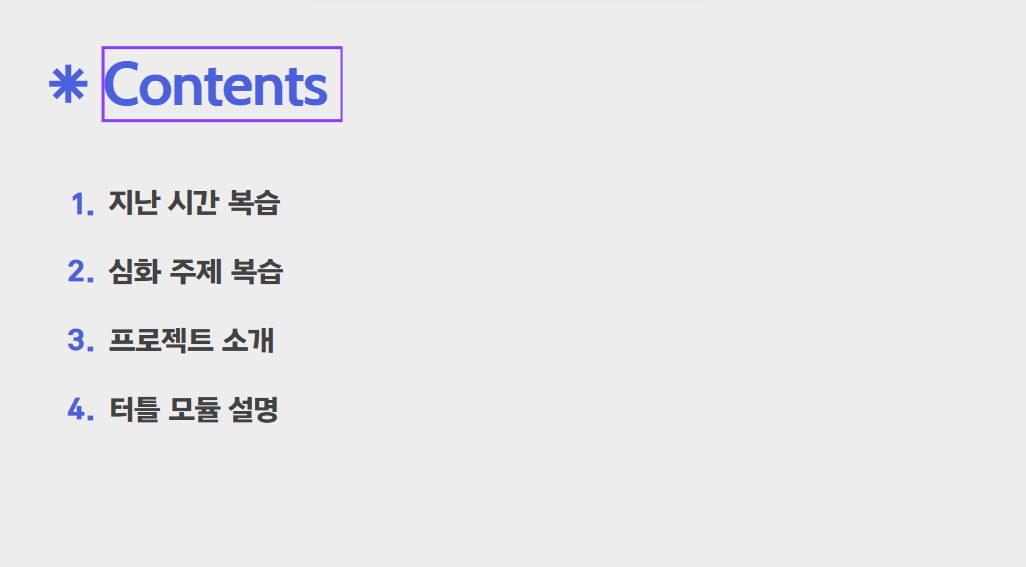
커리큘럼은 이렇게 진행 되었고, 학생들을 6분반으로 3명씩 배정하였고, 나는 5반을 맡게 되었다.\
1교시는 6명이서 돌아가면서 맡고 2교시는 각자 분반에서 1교시에서의 내용으로 실습을 주도했다. 나는 학생들이 막히는 부분 위주로 질문받고 실습을 진행하였는데, 온라인으로 진행하는거라 접속 로딩, 끊김 등등 불편한 점이 많았다. 나중에 개선된다면 오프라인으로 진행하면 좋겠다는 의견이 있다. 학생들이 실제로 알고 코딩을 하는 건지 그냥 보고만 있는건지 확인하기 어려웠다..
그리고 나는 자체적으로 우리반 단톡방을 파두었다. 혹시 안내사항 있거나 불참자 있으면 확인하기 위해서 팀 채팅으로 관리를 해주었다. 프로젝트 제출용으로 쓰기도 했다.
다른 분반에게 물어보니까 퀴즈를 내는 식으로 이끌기도 한다고 했다..!\
그리고 5주차 1교시 진행을 내가 맡게 되었고, 내용은 turtle 모듈과 python idle 설치로 구성하였다. \
상대적으로 브라우저 환경이 익숙할 학생들을 고려해 colab에서 python 실습을 진행하였다.
내가 맡은 5주차 기준으로 지난 시간 복습에서는 1주차-4주차 내용(함수, 변수의 유효범위, 키워드 매개변수, 리스트 자료형 등등)을 다시 훑어주었다.
봉사활동을 같이 진행한 학우분들과 논의해서 프로젝트 주제를 미사일 피하기 게임, 대포 쏘기 게임, 핑퐁 게임 이렇게 세 개로 정했다.
터틀 모듈의 기본 문법을 설명하고 프로젝트 주제를 선정해서 발표했다.\
우리 분반은 핑퐁 게임으로 구성했는데,
```
import turtle as t
import time
def right():
if player.xcor() < 200:
player.forward(15)
def left():
if player.xcor() > -200:
player.backward(15)
t.bgcolor("black")
t.setup(500,700)
player = t.Turtle()
player.shape("square")
player.shapesize(1, 5)
player.up()
player.color("white")
player.speed(0)
player.goto(0, -270)
ball = t.Turtle()
ball.shape("circle")
ball.up()
ball.shapesize(1.5)
ball.speed(0)
ball.color("white")
t.listen()
t.onkeypress(right, "Right")
t.onkeypress(left, "Left")
ball_xspeed = 5
ball_yspeed = 5
game_on = True
life = 1
score = 0
t.up()
t.ht()
t.goto(0, 300)
t.color("white")
t.write(f"SCORE : {score}", False, "center", ("", 30))
while game_on:
new_x = ball.xcor() + ball_xspeed
new_y = ball.ycor() + ball_yspeed
ball.goto(new_x, new_y)
if ball.xcor() > 240 or ball.xcor() < -240:
ball_xspeed *= -1
if ball.ycor() > 340:
ball_yspeed *= -1
if ball.ycor() < -340:
life -= 1
time.sleep(1)
ball.goto(0, 100)
ball_xspeed *= -1
ball_yspeed *= -1
if life == 0:
game_on = False
t.goto(0,0)
t.write("GAME OVER", False, "center", ("", 30))
time.sleep(3)
if player.distance(ball) < 50 and -260 < ball.ycor() < -245:
score += 1
t.clear()
t.write(f"SCORE : {score}", False, "center", ("", 30))
ball_yspeed *= -1
```
-> 임모군의 핑퐁 게임
임모군이 구현한 핑퐁 게임(숫자판이 뜨고 속도가 빠른편)
```
import turtle as t
import random
import time
# 설정
t.bgcolor("white")
t.setup(500, 700)
# 플레이어 설정
player = t.Turtle()
player.shape("square")
player.shapesize(1, 5)
player.penup()
player.speed(0)
player.goto(0, -270)
# 이동 함수
def right():
if player.xcor() < 200:
player.forward(20)
def left():
if player.xcor() > -200:
player.backward(20)
# 키 입력 등록
t.listen()
t.onkeypress(right, "Right")
t.onkeypress(left, "Left")
# 공 설정
ball = t.Turtle()
ball.shape("circle")
ball.shapesize(1.3)
ball.penup()
ball.speed(0)
ball.color("black")
ball.goto(0, 0)
# 공 속도
ball_xspeed = 3
ball_yspeed = 3
# 게임 루프
game_on = True
while game_on:
t.update()
time.sleep(0.01)
new_x = ball.xcor() + ball_xspeed
new_y = ball.ycor() + ball_yspeed
ball.goto(new_x, new_y)
# 벽 반사
if ball.xcor() > 240 or ball.xcor() < -240:
ball_xspeed *= -1
if ball.ycor() > 340:
ball_yspeed *= -1
# 플레이어에 닿으면 반사
if (ball.ycor() < -250 and
player.xcor() - 50 < ball.xcor() < player.xcor() + 50):
ball_yspeed *= -1
# 바닥에 떨어지면 종료
if ball.ycor() < -340:
game_on = False
print("Game Over")
# 종료를 위한 대기
t.done()
```
-> 임모양의 핑퐁 게임
임모양의 핑퐁 게임(속도가 느리고, 점수판이 뜨지 않는다. 미세하지만 공이 버퍼링이 걸리기도 한다. 그럼에도 불구하고 구현 자체는 잘 되었다)
```
import turtle as t
import random
import time
def right():
if player.xcor() < 200:
player.forward(10)
def left():
if player.xcor() > -200:
player.backward(10)
t.bgcolor("red")
t.setup(500, 700)
#player
player = t.Turtle()
player.shap("square")
player.shape(1, 5)
player.up()
player.speed(0)
player.goto(0. -270)
# ball
ball = t.Turtl()
ball.shape("circle")
ball.shapesize(1.3)
ball.up()
ball.speed(0)
ball.color("white")
t.listen()
t.onkeypress(right, "Right")
t.onkeypress(left, "Left")
```
-> 이모군의 핑퐁 게임\
-> 구현이 제대로 되지 않아 실행할 수 없었다..!\
\
학생들을 대상으로 교육 봉사를 한 것은 처음이지만 프로젝트를 리딩한 경험이 의미 있었던 거 같다!
---
# Agent Instructions
This documentation is published with GitBook. GitBook is the documentation platform designed so that both humans and AI agents can read, navigate, and reason over technical content effectively. Learn more at gitbook.com.
## Querying This Documentation
If you need additional information that is not directly available in this page, you can query the documentation dynamically by asking a question.
Perform an HTTP GET request on the current page URL with the `ask` query parameter:
```
GET https://docs.cooku222.kr/project-remind/actions/undefined-1/2025-1.md?ask=
```
The question should be specific, self-contained, and written in natural language.
The response will contain a direct answer to the question and relevant excerpts and sources from the documentation.
Use this mechanism when the answer is not explicitly present in the current page, you need clarification or additional context, or you want to retrieve related documentation sections.