> For the complete documentation index, see [llms.txt](https://docs.cooku222.kr/llms.txt). Markdown versions of documentation pages are available by appending `.md` to page URLs; this page is available as [Markdown](https://docs.cooku222.kr/security/mobile/frida-lab/frida-labs-0x1.md).
# Frida-Labs 0x1
출처:
***
설날이니 미루고 미루던 프리다를 공부하기로 했다.
```
public void onClick(View view) {
String string = editText.getText().toString();
if (TextUtils.isDigitsOnly(string)) {
MainActivity.this.check(i, Integer.parseInt(string));
} else {
Toast.makeText(MainActivity.this.getApplicationContext(), "Enter a valid number !!", 1).show();
}
}
```
위의 자바 코드에서 사용자에게 값을 요구하고, 정수로 값을 변환한 뒤에 check()라는 메서드에 전달하고 있는 것을 확인할 수 있다. \
check(int)에서 어떻게 값을 검증하는지 까보면 된다.
```
final int i = get_random();
```
입력된 숫자와 함께, 또 다른 정수 값 하나가 함께 전달된다.
```
int get_random() {
return new Random().nextInt(100);
}
```
애플리케이션이 시작될 때 위 get\_random() 함수로부터 랜덤 값 하나가 생성된다. 이 값은 0 \~ 100 사이에 있고, 변수 i에 저장되고 있다. get\_random() 함수는 애플리케이션이 시작될 때 한 번 호출되며, 그 이후에는 다시 호출되지 않는다. \
따라서 실행 중에는 난수 값이 변하지 않는다. 다만 애플리케이션을 다시 실행할 때마다 서로 다른 난수가 생성된다.
```
void check(int r4, int r5) {
/*
r3 = this;
int r4 = r4 * 2
int r4 = r4 + 4
r0 = 1
if (r4 != r5) goto L53
android.content.Context r4 = r3.getApplicationContext()
java.lang.String r5 = "Yey you guessed it right"
android.widget.Toast r4 = android.widget.Toast.makeText(r4, r5, r0)
r4.show()
java.lang.StringBuilder r4 = new java.lang.StringBuilder
r4.()
r5 = 0
L1a:
r0 = 20
if (r5 >= r0) goto L49
java.lang.String r0 = "AMDYV{WVWT_CJJF_0s1}"
char r0 = r0.charAt(r5)
r1 = 97
if (r0 < r1) goto L35
r2 = 122(0x7a, float:1.71E-43)
if (r0 > r2) goto L35
int r0 = r0 + (-21)
char r0 = (char) r0
if (r0 >= r1) goto L43
L31:
int r0 = r0 + 26
char r0 = (char) r0
goto L43
L35:
r1 = 65
if (r0 < r1) goto L43
r2 = 90
if (r0 > r2) goto L43
int r0 = r0 + (-21)
char r0 = (char) r0
if (r0 >= r1) goto L43
goto L31
L43:
r4.append(r0)
int r5 = r5 + 1
goto L1a
L49:
android.widget.TextView r5 = r3.t1
java.lang.String r4 = r4.toString()
r5.setText(r4)
goto L60
L53:
android.content.Context r4 = r3.getApplicationContext()
java.lang.String r5 = "Try again"
android.widget.Toast r4 = android.widget.Toast.makeText(r4, r5, r0)
r4.show()
L60:
return
*/
throw new UnsupportedOperationException("Method not decompiled: com.ad2001.frida0x1.MainActivity.check(int, int):void");
}
}
```
이제 check() 함수의 동작 방식을 살펴본다. \
여기서 i는 get\_random()에서 전달된 난수를 의미하고 i2는 사용자가 입력한 값을 정수로 변환한 값을 의미한다.
```
if ((i * 2) + 4 == i2)
```
이 if 문은 입력한 숫자가 (난수 \* 2 + 4)와 같은지 검사한다. 조건이 참인 경우, 하드코딩된 FLAG를 디코딩해 TextView에 출력한다.\
따라서 FLAG를 얻기 위해서는 난수 값을 알아내고, 그 값에 (난수 \* 2 + 4) 연산을 수행한 뒤, 그 결과를 애플리케이션에 입력하면 된다. 이를 위해서는 Frida를 이용해 난수 값을 얻어내는 방법이 필요하며, 그 방법에는 몇 가지가 있다.
#### 방법 1: get\_random() 함수 후킹
난수는 get\_random() 메서드 안에서 생성된다는 것을 알고 있으므로, 이 메서드를 후킹하여 반환값을 직접 확인할 수 있다.\
또는 반환값을 임의의 값으로 덮어써서 get\_random()이 우리가 지정한 값을 check() 함수에 전달하도록 만들 수도 있다.
#### 방법 2: check() 함수 후킹
check() 메서드에 전달되는 인자에는 난수 값이 포함되어 있다. 따라서 이 메서드를 후킹해 전달되는 인자들을 확인함으로써 난수 값을 알아낼 수 있다.
#### Hooking 소개
**Hooking이란?**
Hooking은 애플리케이션이나 Android 시스템 내부의 메서드의 동작을 가로채 그 동작을 수정하거나 변경하는 과정을 말한다.\
예를 들어, 앱 안에 있는 어떤 메서드를 후킹하면 해당 메서드가 원래 수행하던 로직 대신 우리가 직접 정의한 구현 코드가 실행되도록 만들 수 있다.\
즉, 앱의 소스 코드를 직접 수정하지 않아도 실행 중인 동작을 바꿀 수 있다.
**메서드 후킹**
```
Java.perform(function() {
var = Java.use(".");
..implementation = function() {
/*
우리가 직접 정의한 메서드 구현
*/
}
})
```
위는 프리다 템플릿이다.
**Java.perform**
* java.perform은 Frida에서 사용하는 함수로, 안드로이드 애플리케이션 내부에서 실행 중인 자바 코드와 상호작용할 수 있는 특별한 컨텍스트를 생성한다.
* 앱 내부의 자바 코드에 접근하고 조작할 수 있도록 해줌.
* 메서드 후킹
* 자바 클래스 접근
* 앱 동작 관찰 & 제어
**var \ = Java.use("\.\");**
* 대상 안드로이드 앱에 존재하는 자바 크래스를 참조하는 변수 \를 선언한다.
* Java.use() 함수는 사용할 자바 클래스의 전체 이름(패키지명 + 클래스명)을 인자로 받는다.
* \은 앱의 패키지 이름
* \는 우리가 분석+조작하려는 클래스 이름
이렇게 하면 해당 클래스를 Frida 스크립트에서 사용할 수 있게 된다.
**\.\.implementation = function(\) {}**
* 후킹하고 싶은 메서드 지정
* \.\ : 후킹 대상 메서드
* .implementation : 해당 메서드의 구현을 우리가 정의한 코드로 교체
* 원래 코드 대신 여기서 작성한 자바스크립트 코드가 실행된다.
* \는 원래 메서드에 전달되던 인자들을 의미한다.
Vscode로 열어봄
```
Java.perform(function() {
var a= Java.use("com.ad2001.frida0x1.MainActivity");
})
```
앞에서 살펴본 결과 MainActivity의 참조를 해야한다는 것을 파악할 수 있다.\
다음으로, 메서드의 커스텀 구현을 포함하도록 스크립트를 수정할 것이다. 후킹할 메서드는 get\_random이다. 여기서 랜덤 값이 결정되기 때문이다.
```
int get_random() {
return new Random().nextInt(100);
}
```
```
Java.perform(function() {
var a = Java.use("com.ad2001.frida0x1.MainActivity");
a.get_random.implementation = function(){
console.log("This method is hooked");
}
})
```
위 스크립트를 실행하면 get\_random() 함수가 후킹된다. 즉, get\_random() 함수가 호출될 때마다 원래의 코드 대신 우리가 작성한 코드가 실행된다. 여기서는 해당 메서드가 호출될 때 콘솔에 This method is hooked라는 문구가 출력된다. \
(아직 스크립트가 완성된 것은 아니며, get\_random() 함수는 인자를 받고 있지 않다)\
이제 스크립트를 실행해서 실제로 어떤 동작을 하는지 확인한다.
```
C:\Users\after\Downloads>frida -U -f com.ad2001.frida0x1
____
/ _ | Frida 17.5.1 - A world-class dynamic instrumentation toolkit
| (_| |
> _ | Commands:
/_/ |_| help -> Displays the help system
. . . . object? -> Display information about 'object'
. . . . exit/quit -> Exit
. . . .
. . . . More info at https://frida.re/docs/home/
. . . .
. . . . Connected to Android Emulator 5554 (id=emulator-5554)
Spawned `com.ad2001.frida0x1`. Resuming main thread!
[Android Emulator 5554::com.ad2001.frida0x1 ]-> Java.perform(function(){ var a= Java.use("com.ad2001.frida0x1.Ma
inActivity"); a.get_random.implementation = function(){ consol.log("This method is hooked"); } })
```
프리다가 붙어 함수가 실행되는 것을 확인할 수 있다.
아직 아무런 인자가 전달되진 않아서 동작하진 않는다. 아무 숫자를 넣어보면 Try again이라 할 것이다. \
get\_random() 함수와 우리가 주입하는 프리다 타이밍이 맞지 않아 생기는 이슈로 이를 수정해준다. 우선 방금 후킹에 사용한 코드를 .js 파일로 저장해준다.
```
C:\Users\after\Downloads>frida -U -f com.ad2001.frida0x1 -l .\script.js
____
/ _ | Frida 17.5.1 - A world-class dynamic instrumentation toolkit
| (_| |
> _ | Commands:
/_/ |_| help -> Displays the help system
. . . . object? -> Display information about 'object'
. . . . exit/quit -> Exit
. . . .
. . . . More info at https://frida.re/docs/home/
. . . .
. . . . Connected to Android Emulator 5554 (id=emulator-5554)
Spawning `com.ad2001.frida0x1`... Spawned `com.ad2001.frida0x1`. Resuming main thread!
Error: could not parse 'C:\Users\after\Downloads\script.js' line 1: unexpected end of string
at (/frida/repl-1.js:1)
```
여기서 에러가 생긴다. 후킹은 성공했지만 반환값이 정의되어 있지 않다. 앞서 get\_random()을 살펴보면
```
int get_random() {
return new Random().nextInt(100);
}
```
\
그런데 후킹한 구현에서 return을 안 해버리면 Java 쪽에서는 이 메서드는 int를 반환해야 하는데 반환값이 없다라고 판단해서 에러가 뜬다.\
또한 그 반환값은 보통 i 같은 변수에 들어가서 check() 같은 함수에서 비교/검증에 쓰이니까 반환이 없으면 앱 로직도 깨진다.\
그래서 해당 script.js 안에서 int 하나를 리턴해주면 된다. 어떤 값이든 가능하고, 예시로 5를 넣는다.
```
Java.perform(function () { var a = Java.use("com.ad2001.frida0x1.MainActivity"); a.get_random.implementation = function () { console.log("This method is hooked"); console.log("Returning 5"); return 5; }; });
```
이제부터 get\_random()은 호출될 때마다 무조건 5를 반환한다.
***
#### 실행 명령
```
C:\Users\after\Downloads>frida -U -f com.ad2001.frida0x1 -l .\script.js
____
/ _ | Frida 17.5.1 - A world-class dynamic instrumentation toolkit
| (_| |
> _ | Commands:
/_/ |_| help -> Displays the help system
. . . . object? -> Display information about 'object'
. . . . exit/quit -> Exit
. . . .
. . . . More info at https://frida.re/docs/home/
. . . .
. . . . Connected to Android Emulator 5554 (id=emulator-5554)
Spawning `com.ad2001.frida0x1`... Spawned `com.ad2001.frida0x1`. Resuming main thread!
[Android Emulator 5554::com.ad2001.frida0x1 ]-> This method is hooked
Returning 5
```
```
if ((i * 2) + 4 == i2)
```
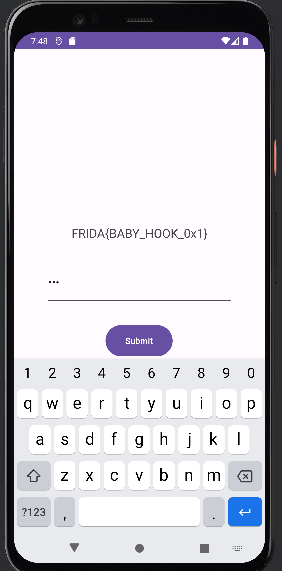
i에 5가 씌워졌으므로 계산하면 14이다. 이를 에뮬레이터 안에 넣으면 플래그가 출력된다.
```
C:\Users\after\Downloads>frida -U -f com.ad2001.frida0x1 -l .\script.js
____
/ _ | Frida 17.5.1 - A world-class dynamic instrumentation toolkit
| (_| |
> _ | Commands:
/_/ |_| help -> Displays the help system
. . . . object? -> Display information about 'object'
. . . . exit/quit -> Exit
. . . .
. . . . More info at https://frida.re/docs/home/
. . . .
. . . . Connected to Android Emulator 5554 (id=emulator-5554)
Spawning `com.ad2001.frida0x1`... Spawned `com.ad2001.frida0x1`. Resuming main thread!
[Android Emulator 5554::com.ad2001.frida0x1 ]-> This method is hooked
The return value is 72
The value to bypass the check 148
```
위와 같이 값 자체를 후킹하는 방법도 있다.
---
# Agent Instructions
This documentation is published with GitBook. GitBook is the documentation platform designed so that both humans and AI agents can read, navigate, and reason over technical content effectively. Learn more at gitbook.com.
## Querying This Documentation
If you need additional information that is not directly available in this page, you can query the documentation dynamically by asking a question.
Perform an HTTP GET request on the current page URL with the `ask` query parameter:
```
GET https://docs.cooku222.kr/security/mobile/frida-lab/frida-labs-0x1.md?ask=
```
The question should be specific, self-contained, and written in natural language.
The response will contain a direct answer to the question and relevant excerpts and sources from the documentation.
Use this mechanism when the answer is not explicitly present in the current page, you need clarification or additional context, or you want to retrieve related documentation sections.